Deliverability
Gmail, Yahoo and Outlook Sender Requirements: What Cold Emailers Must Do in 2026
By Kaysid Team · · 6 min read
In February 2024, Google and Yahoo changed the rules for anyone sending email at volume. In May 2025, Microsoft followed for Outlook.com, Hotmail and Live addresses. Together these three providers handle a huge share of the world's inboxes, so their requirements are now effectively the rules of email.
This guide explains exactly what each provider asks for, what it means for cold email specifically (where the rules are often misunderstood), and a checklist to make sure every domain you send from complies.
The short version
If you send cold email, every sending domain must have:
- SPF and DKIM set up and passing.
- A DMARC record, at least
p=none, with the From domain aligned with SPF or DKIM. - Valid forward and reverse DNS for the sending servers (handled for you by Google Workspace and Microsoft 365).
- TLS for sending (also handled by major providers).
- A spam complaint rate under 0.3%, ideally under 0.1%.
- An easy way to opt out, ideally one-click unsubscribe headers, and opt-outs honored quickly.
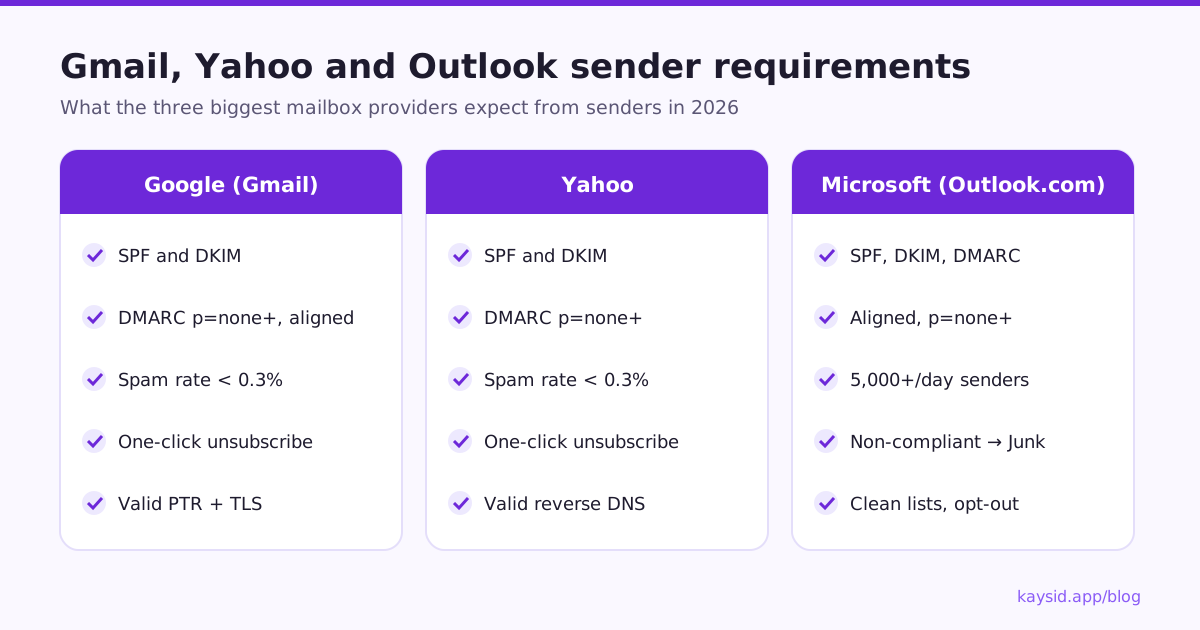
Google (Gmail) sender requirements
Google's guidelines apply in two tiers. All senders to personal Gmail accounts must:
- Set up SPF or DKIM for the sending domain.
- Have valid forward and reverse DNS (PTR) records for sending IPs.
- Use TLS to transmit email.
- Keep the spam rate reported in Postmaster Tools below 0.3%.
- Format messages according to the email standard (RFC 5322).
- Not impersonate Gmail From headers.
Bulk senders, defined by Google as those sending around 5,000 or more messages a day to personal Gmail accounts, must also:
- Set up both SPF and DKIM.
- Publish a DMARC policy (
p=noneis enough) with alignment: the From domain must match the SPF or DKIM domain. - For marketing and subscribed messages, support one-click unsubscribe and include a clearly visible unsubscribe link in the body, honoring requests within two days.
Yahoo sender requirements
Yahoo announced its requirements alongside Google's and they are closely aligned: SPF and DKIM authentication, a DMARC policy of at least p=none for bulk senders, a low spam complaint rate (Yahoo also points to 0.3% as the limit), one-click unsubscribe for bulk senders that is honored within two days, and valid reverse DNS. If you comply with Google's rules, you comply with Yahoo's.
Microsoft (Outlook.com, Hotmail, Live) requirements
In 2025 Microsoft started enforcing requirements for domains sending more than 5,000 emails a day to its consumer addresses (outlook.com, hotmail.com, live.com). Those senders need SPF, DKIM and DMARC (at least p=none, aligned with SPF or DKIM). Mail that doesn't comply is first routed to Junk, and Microsoft said rejection would follow.
Microsoft also lists best practices that look a lot like Google's: a functional unsubscribe link, clean lists with invalid addresses removed, accurate From and Reply-To addresses, and no misleading subject lines.
Note that these rules are about consumer Outlook addresses. Business mailboxes on Microsoft 365 are protected by Microsoft Defender filtering configured by each company, which weighs the same signals: authentication, reputation and content.
Side-by-side comparison
| Requirement | Yahoo | Microsoft | |
|---|---|---|---|
| SPF | Required (both SPF and DKIM for bulk) | Required | Required for high-volume senders |
| DKIM | Required for bulk | Required | Required for high-volume senders |
| DMARC | p=none minimum, aligned (bulk) | p=none minimum (bulk) | p=none minimum, aligned |
| Spam rate | Under 0.3%, aim for under 0.1% | Under 0.3% | Keep complaints low (best practice) |
| One-click unsubscribe | Bulk marketing and subscribed mail | Bulk senders | Functional unsubscribe (best practice) |
| Reverse DNS / TLS | Required | Required | Expected |
| Volume threshold | About 5,000/day to Gmail | Bulk senders | Over 5,000/day to consumer Outlook |
What this means for cold email
"I only send 50 a day, so the rules don't apply to me"
This is the most common misreading. The authentication rules (SPF or DKIM, valid DNS, TLS, low spam rate) apply to every sender. And thresholds are counted per domain: five mailboxes on one domain sending 50 a day each is 250 a day from that domain, and agencies with many clients on shared infrastructure cross 5,000 quickly. Meet the full standard and you never have to wonder.
Does cold email need an unsubscribe link?
Google's one-click unsubscribe requirement is written for marketing and subscribed messages, and cold outreach is a gray area in that wording. But in practice: a clear way to opt out lowers spam complaints (people who can't easily unsubscribe click "report spam" instead), and laws like CAN-SPAM and GDPR expect an opt-out on commercial email anyway. Include one. See Is cold email legal?.
The 0.3% spam rate is the real constraint
For cold email, the hardest requirement isn't technical, it's the spam complaint rate. If 3 people in 1,000 hit "report spam", you're at the limit. Cold emails get reported far more than newsletters, because recipients didn't ask for them. The only defense is relevance: targeted lists, genuinely personal emails, low volume per mailbox and an easy way out.
How to check that your domain complies
- Send a test email to a personal Gmail address you control.
- Open it, click the three-dot menu and choose Show original.
- Look for
SPF: PASS,DKIM: PASSandDMARC: PASSat the top. - Check that the domain in
DKIM: PASS with domainmatches your From address domain. - Look up your DMARC record with any DNS lookup tool:
dig TXT _dmarc.yourdomain.com +short
"v=DMARC1; p=none; rua=mailto:dmarc@yourdomain.com"
Then register the domain in Google Postmaster Tools to see your spam rate and domain reputation once you have enough volume to Gmail users.
A compliance checklist for every sending domain
| Check | Done when |
|---|---|
| SPF record | One TXT record v=spf1 ... including your email provider, ending in ~all or -all |
| DKIM | Enabled in your admin console, test email shows DKIM: PASS for your domain |
| DMARC | _dmarc TXT record with p=none or stricter, and a rua address for reports |
| Alignment | Test email shows DMARC: PASS |
| Unsubscribe | Every campaign email has a visible opt-out and one-click headers |
| Suppression | Opt-outs, bounces and complaints are never emailed again, across all campaigns |
| Spam rate | Postmaster Tools shows under 0.1% |
| List hygiene | Hard bounces under 2% |
How Kaysid keeps you compliant
- You send from your own Google Workspace, Microsoft 365 or SMTP mailbox, so SPF and DKIM are your domain's, and alignment works.
- The Domain health page checks SPF, DKIM and DMARC for each sending domain and explains in plain words what to fix.
- Every campaign email carries one-click unsubscribe headers, and opt-outs go on a workspace-wide do-not-email list that every campaign respects.
- Bounces are detected automatically, and a campaign pauses itself if bounces pass 5%, before providers start to distrust you.
Frequently asked questions
Do Gmail's sender requirements apply to cold email?
Yes. The authentication, DNS, TLS and spam-rate rules apply to everyone sending to Gmail. The bulk rules apply once a domain sends around 5,000 messages a day to Gmail users, which cold email teams can reach across several mailboxes.
Is DMARC p=none enough?
For the Google, Yahoo and Microsoft requirements, yes: p=none with alignment is the minimum. Moving to p=quarantine or p=reject later adds protection against spoofing once you're sure all your legitimate mail passes.
What is one-click unsubscribe?
It's a pair of email headers, List-Unsubscribe and List-Unsubscribe-Post (RFC 8058), that let Gmail and other clients show an Unsubscribe button which opts the person out without them visiting a page or replying.
What happens if I don't meet the requirements?
Emails that fail authentication are more likely to be rejected or sent to spam. Gmail may temporarily reject non-compliant bulk traffic, and Microsoft routes non-compliant high-volume mail to Junk.
How do I see my Gmail spam rate?
Verify your domain in Google Postmaster Tools. It shows spam rate and domain reputation once you send enough email to Gmail users each day.