Deliverability
Cold Email Deliverability in 2026: The Complete Guide to Landing in the Inbox
By Kaysid Team · · 9 min read
You can write the best cold email of your career and still get zero replies, because nobody saw it. It went to spam, to the Promotions tab, or was quietly dropped. Deliverability is the part of cold email that decides whether your message reaches a human at all, and in 2026 it is stricter than it has ever been.
This guide covers everything that decides where a cold email lands: how mailbox providers judge you, the technical setup you can't skip, how much you can send, what your copy does to placement, and how to tell when something is going wrong before your domain is burned. Every section ends with something you can do today.
What deliverability actually means
Delivery and deliverability are not the same thing. An email is delivered when the receiving server accepts it. Deliverability is where it ends up after that: the inbox, a tab, the spam folder, or nowhere. A tool that reports a 99% delivery rate can still have half of its emails in spam, because the receiving server accepted them and then filed them where nobody looks.
Gmail, Outlook and Yahoo decide placement with the same broad question: does this person want this email from this sender? For cold email, the recipient has never heard of you, so providers lean on everything else they know: is the sender who they claim to be, how does their domain normally behave, do other people engage with their mail, and does this message look like the bulk mail people report as spam?
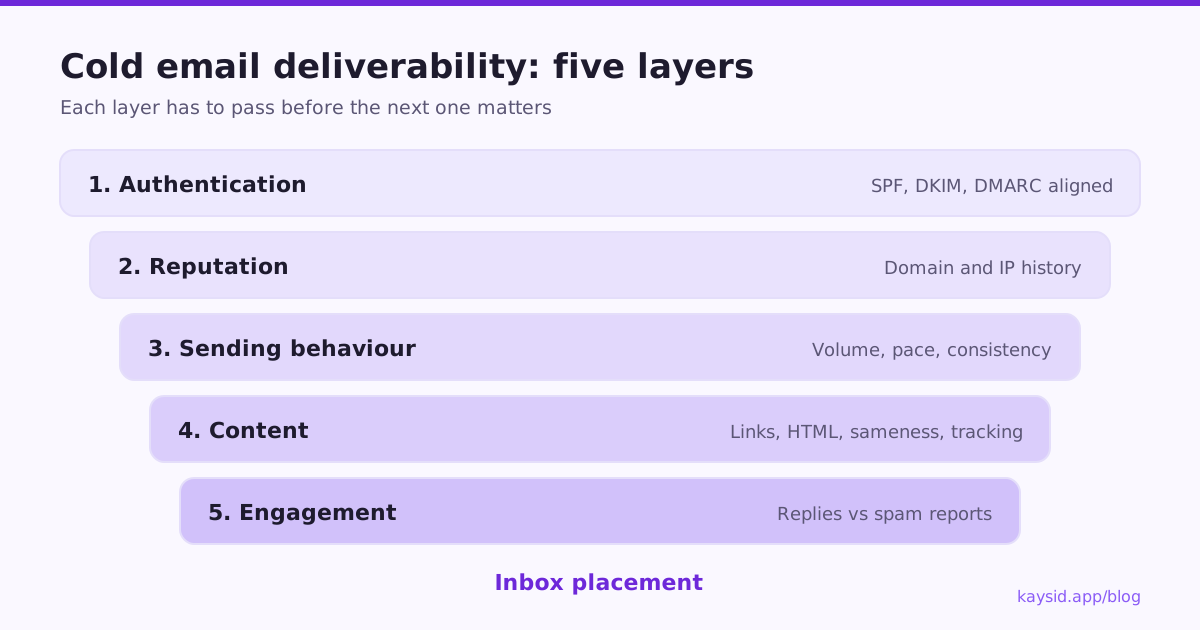
The five layers that decide inbox placement
1. Authentication: prove you are who you say you are
SPF, DKIM and DMARC are DNS records that let a receiving server confirm that your mail really comes from your domain and wasn't tampered with. Since February 2024, Gmail and Yahoo require them, and Microsoft began enforcing similar rules for high-volume senders in 2025. Without them, you aren't at a disadvantage: you're out. We walk through each record in How to set up SPF, DKIM and DMARC.
2. Reputation: your domain's track record
Every sending domain and IP builds a reputation from how its past mail was received. A new domain has no history, which is why it needs warming up; a domain with a history of spam complaints and bounces is treated with suspicion, however good today's email is. Reputation is the slowest layer to build and the quickest to lose.
3. Sending behaviour: volume and rhythm
Sudden spikes are a classic spam signal. A mailbox that sent 10 emails yesterday and 400 today looks compromised. Real people send in a steady, irregular rhythm through the working day, and providers notice when a mailbox fires 50 identical messages in two minutes.
4. Content: what the message looks like
Filters read the message: links, images, tracking, HTML weight, spam-trigger phrasing, and whether the text is near-identical to thousands of other messages. Content rarely saves a bad reputation, but it can sink a good one.
5. Engagement: what recipients do
Replies, moves out of spam and "not spam" clicks are strong positive signals. Deleting without reading, and especially reporting as spam, are the strongest negative ones. Google asks senders to keep spam complaints below 0.3%, and recommends staying under 0.1%.
The technical setup you can't skip
Before your first cold email, every sending domain needs this baseline. None of it is optional any more.
| Requirement | What it does | How to check |
|---|---|---|
| SPF record | Lists the servers allowed to send for your domain | A TXT record starting with v=spf1 on the domain |
| DKIM signing | Signs each email so receivers can verify it wasn't altered | Enabled in Google Workspace / Microsoft 365 admin, record at selector._domainkey |
| DMARC policy | Tells receivers what to do when SPF/DKIM fail, and where to send reports | A TXT record at _dmarc.yourdomain.com, at least p=none |
| Alignment | The From domain matches the SPF or DKIM domain | Send to a Gmail address, open "Show original", look for dmarc=pass |
| One-click unsubscribe | Lets people opt out without replying | List-Unsubscribe and List-Unsubscribe-Post headers on the email |
| Custom tracking domain | Keeps tracking links on your own domain, not a shared one | A CNAME such as track.yourdomain.com |
How much you can send without hurting deliverability
Volume is where most people break things. The sustainable rule of thumb in 2026: about 30 to 50 cold emails per mailbox per day, after warm-up, spread across the working day. More volume comes from more mailboxes and domains, not from pushing one mailbox harder.
- Start a new mailbox with warm-up only, then add a handful of cold emails a day and grow gradually over two to four weeks.
- Space emails a few minutes apart, with some randomness, rather than sending in bursts.
- Send during the recipient's working hours and working days.
- Spread a campaign across several mailboxes so no single one carries the load.
We go deeper on the numbers, including how to calculate how many mailboxes you need, in How many cold emails can you send per day?.
Content that stays out of spam
Spam filters in 2026 are machine-learned, so there's no magic list of banned words. But some patterns reliably hurt placement:
- Too many links. One link, or none in the first email, is safest. Never use link shorteners.
- Images and heavy HTML. A cold email should look like a note from a person: plain text or very light formatting, no banners.
- Identical messages at scale. Thousands of byte-identical emails form a fingerprint. Personalize meaningfully, and vary your wording.
- Attachments. Don't attach files to a first cold email. Offer to send them.
- Hype phrasing. Excessive capitals, exclamation marks and "guaranteed" or "free money" style claims still correlate with spam.
- Open tracking pixels. They add a remote image to every email. Many senders now turn open tracking off for cold outreach and judge campaigns by replies instead.
The most powerful content lever isn't avoiding trigger words, it's relevance. An email written for one specific person, about their specific situation, gets replies, and replies are the best deliverability signal there is. That's why per-lead personalization has become the standard; see AI cold email personalization at scale.
Warm-up: building trust before you ask for it
A brand-new domain has no reputation, and a mailbox that goes from silent to busy overnight is suspicious. Warm-up solves this by sending low volumes of normal, engaging email for a few weeks and slowly increasing it. Expect two to four weeks before a new mailbox is ready for real cold volume. Our email warm-up guide has a week-by-week schedule.
List quality: the deliverability problem nobody talks about
Bounces are one of the fastest ways to damage a domain. A list with 8% invalid addresses tells every provider you're mailing people you don't know, from a list you didn't check. Keep hard bounces under 2% and treat anything near 5% as an emergency.
- Verify addresses before importing a list, and re-verify lists older than a few months.
- Be careful with catch-all domains, which accept everything and bounce later.
- Avoid shared inboxes like info@ and sales@ for personal outreach. They reply less and complain more.
- Never buy lists of scraped addresses with no source.
See How to build a B2B lead list for a full cleaning workflow.
Signs your cold emails are going to spam
Deliverability problems are silent. Watch for these warning signs:
- Reply rate drops sharply with no change in your copy or audience.
- Open rate collapses to near zero on one provider (Gmail or Outlook) but not the other.
- Bounce rate rises, especially with "blocked" or "policy" errors rather than "user unknown".
- Seed tests land in spam: send to a few test inboxes you own on different providers and check where they land.
- Google Postmaster Tools shows your domain reputation dropping to Low or Bad, or spam rate climbing.
How to recover a damaged sender reputation
- Pause all cold sending from the affected domain.
- Check authentication: SPF, DKIM and DMARC must all pass.
- Find the trigger: a list with high bounces, a spike in volume, or a complaint wave from a particular segment.
- Clean the list and remove anyone who bounced or complained.
- Restart at warm-up volume and only send to your most relevant, verified leads, aiming for replies.
- If the domain is badly burned, retire it and move to a fresh, properly warmed domain. Sometimes that's faster than repair.
A 2026 cold email deliverability checklist
| Area | Do this | Target |
|---|---|---|
| Domains | Use secondary domains, never your main one | 1 to 3 mailboxes per domain |
| Authentication | SPF, DKIM, DMARC aligned on every domain | dmarc=pass on test emails |
| Warm-up | Warm every new mailbox before cold sending | 2 to 4 weeks |
| Volume | Cap cold emails per mailbox per day | 30 to 50 after warm-up |
| Pacing | Random gaps between emails, business hours only | Minutes apart, not seconds |
| List | Verify, de-duplicate, remove role addresses | Bounces under 2% |
| Content | Plain text, few links, real personalization | Zero spam-folder seed tests |
| Complaints | Easy one-click unsubscribe, relevant targeting | Under 0.1% |
| Monitoring | Watch replies, bounces and Postmaster Tools | Weekly review |
How Kaysid handles deliverability for you
If you're comparing tools, our guide to the best cold email software in 2026 lists what to look for. We built Kaysid around the rules in this guide, so the safe way to send is the default:
- Your own mailboxes. Send from Google Workspace, Microsoft 365 or any SMTP mailbox, so your mail carries your domain's reputation, not a shared pool's.
- Human pacing. Each mailbox sends one email every few minutes with random gaps, only inside your sending hours, and never above its daily limit.
- Built-in warm-up with a gradual ramp, and a domain health check for SPF, DKIM and DMARC.
- Several mailboxes per campaign. Leads are spread across them, and each lead's follow-ups stay in the same mailbox and thread.
- Automatic protection. Bounces are detected and suppressed, and a campaign pauses itself if its bounce rate passes 5%. Replies stop the sequence automatically.
- One-click unsubscribe and a workspace-wide do-not-email list.
Frequently asked questions
Why are my cold emails going to spam?
The most common causes are missing or misaligned SPF/DKIM/DMARC, a new domain that wasn't warmed up, sending too many emails per mailbox per day, a list with too many invalid addresses, and links or tracking that look like bulk mail. Fix authentication first, then volume, then list quality.
What is a good inbox placement rate for cold email?
Aim for the large majority of your emails to land in the primary inbox in seed tests on Gmail and Outlook. If a meaningful share land in spam on any provider, treat it as a problem to fix before you scale.
Does open tracking hurt cold email deliverability?
It can. Open tracking adds a remote image to every email, which makes it look more like bulk marketing mail. Apple Mail Privacy Protection also makes open rates unreliable. Many senders now turn it off and measure replies instead.
How long does it take to fix a damaged sender reputation?
Usually several weeks of low-volume, high-engagement sending after you've fixed the cause. If a domain is badly burned, moving to a new, properly warmed secondary domain is often faster.
Should I send cold email from my main domain?
No. Use one or more secondary domains for cold outreach so any reputation damage never affects your company's day-to-day email.