Strategy
AI Cold Email Personalization at Scale: Write a Unique Email for Every Lead (Without Sounding Like a Robot)
By Kaysid Team · · 6 min read
Everyone now has access to an AI that can write a decent email in seconds. That has changed cold email in two directions at once. Generic AI emails have flooded inboxes, so people and spam filters have become very good at ignoring them. And the teams using AI well, to research each lead and write one genuinely specific email per person, are getting reply rates that template campaigns can't touch.
This guide shows the workflow that works: research, a prompt that produces emails people believe were written for them, a spreadsheet with one email per lead, checks before you send, and how to send each lead their own email from your own mailbox.
Why "Hi {{First Name}}" isn't personalization any more
Merge tags were a big deal in 2015. Today, a first name and company name inside an otherwise identical email reads as automation, because it is. Real personalization means the reason you're writing is specific to them: something on their website, a job post, a review, a product launch, their local market.
It also matters for deliverability. Thousands of near-identical emails form a pattern filters recognise. Thousands of genuinely different emails don't.
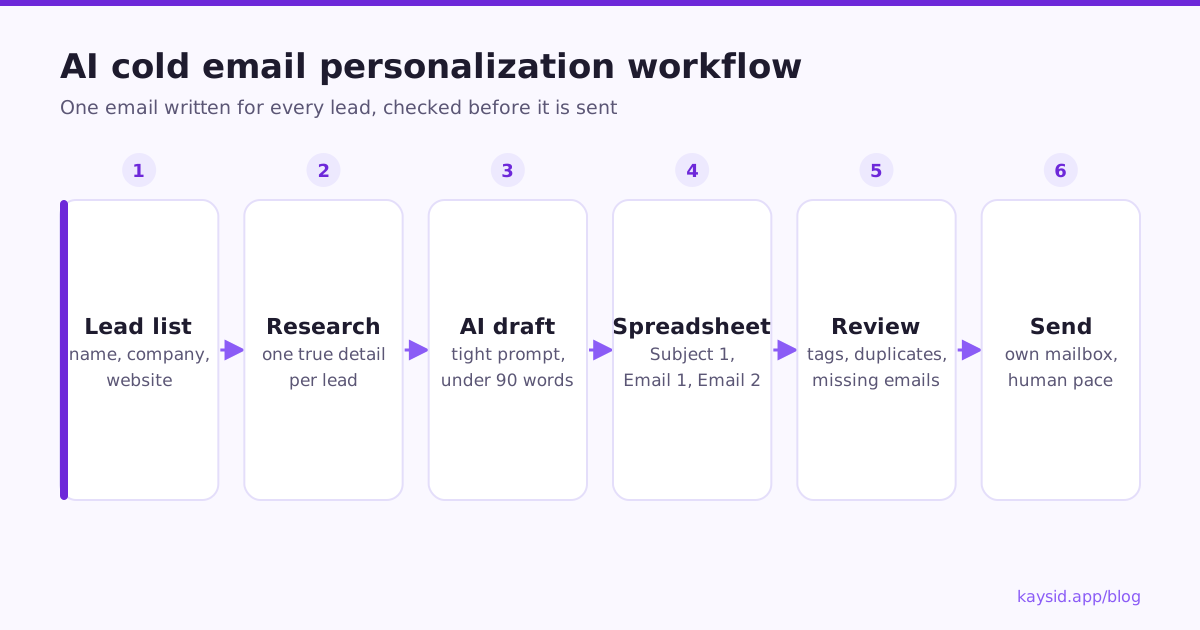
The workflow: one email per lead
- Build a focused list with the fields AI needs: name, company, website, role, and anything you know (city, industry, a recent event).
- Research each lead. An AI assistant with web access can read their website and note one or two specific, true observations.
- Generate the email from those observations with a tight prompt and your offer.
- Save everything in a spreadsheet: one row per lead, with columns for each email's subject and body.
- Review before sending: spot-check the writing, and run automatic checks for empty fields, placeholders and near-duplicates.
- Import and send so every lead gets exactly the email written for them, with follow-ups.
A prompt that produces believable emails
The difference between a robotic AI email and a good one is almost entirely the prompt. Constrain length, ban the clichés, require a specific observation, and give it your real offer and proof.
You write short B2B cold emails for {{Your company}}, which {{one-line offer}}.
Proof you may use: {{one real result}}.

For the lead below, write ONE email:
- Subject: 2-5 words, lowercase, specific to them. No "quick question".
- Under 90 words. Plain text. No links. No emojis.
- First line: one specific, true observation from their website or the
  details given. If you can't find one, say so instead of inventing.
- Then: the problem it suggests, our offer in one sentence, the proof.
- End with one low-effort question.
- Sign off with exactly: [Your Name]
- Never use: "I hope this finds you well", "I came across",
  "I wanted to reach out", "game-changer", "revolutionize", "synergy".

Lead: {{name}}, {{role}} at {{company}} ({{website}}), {{city}}.The spreadsheet format
Keep one row per lead and put each email in its own columns: Subject 1 and Email 1 for the first email, Email 2 for the first follow-up, and so on. This is the format of Kaysid's import template, so no column mapping is needed:
| First Name | Company | Website | Subject 1 | Email 1 | Email 2 | |
|---|---|---|---|---|---|---|
| ann@acme.com | Ann | Acme Dental | acmedental.com | acme's booking page | Hi Ann, I tried booking... | Hi Ann, one thing I... |
| raj@brightfit.io | Raj | BrightFit | brightfit.io | brightfit's class app | Hi Raj, noticed... |
Quality checks before you send
AI makes mistakes at scale, and a mistake in a cold email is public. Check for:
| Problem | What it looks like | Fix |
|---|---|---|
| Hallucinated facts | "Congrats on your new office in Paris" (there isn't one) | Spot-check observations against websites; prompt it not to invent |
| Leftover placeholders | [Company Name], {{first_name}} left in the text | Automatic placeholder checks |
| Near-identical emails | AI fell back to the same template for 40 leads | Detect duplicates; regenerate with more research |
| Empty rows | Lead imported with no email body | Hold those leads until written |
| Too long or salesy | 200-word emails with feature lists | Enforce word limits in the prompt |
| Wrong person | Emails to info@ or sales@ addresses | Prefer named people; flag shared inboxes |
Using AI assistants that can browse
Assistants with web access, like ChatGPT, Claude or Grok, can visit a lead's website and pull out real details, which is what makes the first line credible. A practical setup:
- Give the assistant your offer, proof, rules and the column layout of your spreadsheet.
- Ask it to work through the list in batches of 20 to 50 and return rows in that layout.
- Ask it to mark rows where it couldn't find anything specific, instead of guessing.
- Paste the results into your spreadsheet and import it.
Kaysid's import screen includes ready-made instructions you can copy straight into an AI assistant, plus a template spreadsheet in the right format.
Personalized follow-ups
If the first email is personal, the follow-ups can build on it. A good pattern: email 1 is fully personal; email 2 adds a second, personal angle; the breakup email can be shared across everyone. Leads without a personal email for a step simply get the shared one. See How to write a follow-up sequence.
Does AI personalization actually improve replies?
When the observation is real and relevant, yes, often substantially, because the email answers the reader's first question: "why are you writing to me?". When it's shallow ("I saw you're the CEO of Acme"), it performs no better than a template, and sometimes worse, because people recognise the pattern.
Keep it honest
- Never claim you did something you didn't ("I loved your podcast episode" when you didn't listen).
- Don't fake familiarity or invent mutual connections.
- Make sure the observation is about the business, not intrusive personal details.
Send every lead its own email with Kaysid
- Import a spreadsheet (Excel or CSV) where every lead has its own emails. Columns are detected automatically.
- Review every lead before launch: empty fields, unknown tags, leftover
[Your Name]placeholders, emails that read almost the same, and leads with nothing written. - Leads with no email for a step are held, never sent a blank or half-filled email, until you write it or skip them.
- Your name is filled in automatically from the mailbox that sends each email, even with several mailboxes in one campaign.
- Follow-ups thread under the first email and stop when the lead replies.
Frequently asked questions
Can I use ChatGPT to write cold emails?
Yes, and it works well if you give it real research about each lead, strict rules on length and tone, and review the results. Generic prompts produce generic emails that get ignored.
Do AI-written cold emails go to spam?
Not because AI wrote them. Emails go to spam because of authentication, volume, reputation and patterns. Thousands of near-identical AI emails create a pattern; genuinely different emails per lead don't.
How do I send a different email to each lead?
Put each lead's email in your spreadsheet (subject and body columns per step) and import it into a tool that sends each lead its own text, such as Kaysid.
How many leads can I personalize with AI per day?
Hundreds, in batches. The real limit is sending: 30 to 50 emails per mailbox per day keeps deliverability healthy.
Should I tell people the email was written with AI?
There's no general requirement for business email, but the email must be truthful. Review the content and never let AI invent facts or familiarity.