Deliverability
How to Set Up SPF, DKIM and DMARC for Cold Email (Step by Step)
By Kaysid Team · · 5 min read
SPF, DKIM and DMARC sound like the kind of thing only IT people should touch. In reality, setting them up takes about 20 minutes per domain, involves copying three records into your DNS, and is the single biggest thing you can do for cold email deliverability.
This guide explains what each record does in plain English, gives you copy-paste values for Google Workspace and Microsoft 365, shows you how to test that everything passes, and lists the mistakes that quietly send cold emails to spam.
What SPF, DKIM and DMARC do (in plain English)
Think of an email like a letter. Anyone can write any return address on an envelope. These three records let the receiving post office check whether the letter really came from you.
| Record | Plain-English job | Lives at |
|---|---|---|
| SPF | A list of the servers allowed to send email for your domain | TXT record on yourdomain.com |
| DKIM | A tamper-proof signature on every email, checked with a public key in your DNS | TXT or CNAME at selector._domainkey.yourdomain.com |
| DMARC | Your instructions for emails that fail SPF and DKIM, plus where to send reports | TXT record at _dmarc.yourdomain.com |
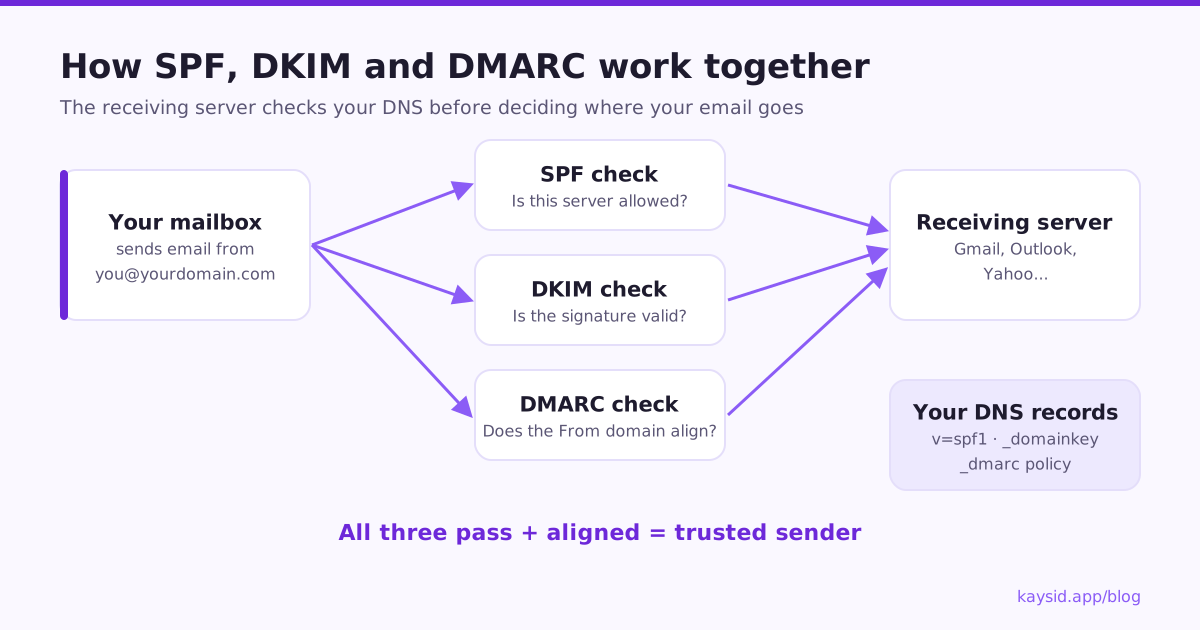
The key idea is alignment: DMARC only passes if the domain in your visible From address matches the domain that passed SPF or DKIM. That is what stops someone else using your name.
Before you start
- Access to your domain's DNS (where you bought the domain, or Cloudflare, or similar).
- Admin access to your Google Workspace or Microsoft 365 account.
- Ideally, a secondary domain for cold email (for example
tryacme.com), so your main domain is never at risk.
Step 1: Set up SPF
SPF is a single TXT record on the root of your domain (host @). There must be only one SPF record per domain; if you use several services, combine them into one.
Host: @
Type: TXT
Value: v=spf1 include:_spf.google.com ~allHost: @
Type: TXT
Value: v=spf1 include:spf.protection.outlook.com ~allv=spf1 include:_spf.google.com include:sendgrid.net ~all~all (soft fail) is the usual choice while you're setting up; -all (hard fail) is stricter. Both are fine once everything that legitimately sends for your domain is listed.
Step 2: Turn on DKIM
Google Workspace
- Open the Google Admin console and go to Apps → Google Workspace → Gmail → Authenticate email.
- Select your domain and click Generate new record. Choose a 2048-bit key if your DNS host supports it.
- Copy the TXT record name (usually
google._domainkey) and its long value. - Add it to your DNS as a TXT record.
- Wait for DNS to update (minutes to a few hours), then return to the admin console and click Start authentication.
Microsoft 365
- Open the Microsoft Defender portal and go to Email & collaboration → Policies & rules → Threat policies → Email authentication settings → DKIM.
- Select your domain. Microsoft shows two CNAME records,
selector1._domainkeyandselector2._domainkey. - Add both CNAME records to your DNS exactly as shown.
- Return to the DKIM page and switch signing on for the domain.
Host: selector1._domainkey
Type: CNAME
Value: selector1-yourdomain-com._domainkey.yourtenant.onmicrosoft.comStep 3: Publish DMARC
Start with a monitoring policy. It doesn't block anything, it just asks receivers to send you reports, and it meets the Google, Yahoo and Microsoft requirements.
Host: _dmarc
Type: TXT
Value: v=DMARC1; p=none; rua=mailto:dmarc-reports@yourdomain.com; fo=1| Tag | Meaning |
|---|---|
v=DMARC1 | Version, always first |
p=none | Policy: monitor only. Later quarantine (spam) or reject (block) |
rua=mailto:... | Where daily aggregate reports are sent |
fo=1 | Ask for failure details when any check fails |
pct=100 | Optional: share of mail the policy applies to, useful when moving to stricter policies |
After a few weeks of clean reports showing that your legitimate mail passes, you can move to p=quarantine and eventually p=reject for strong protection against spoofing. For cold email domains, p=none or p=quarantine is common and perfectly acceptable.
Step 4: Test that everything passes
- Send an email from the mailbox to a personal Gmail address.
- In Gmail, open it, click ⋮ → Show original.
- You want to see
SPF: PASS,DKIM: PASSandDMARC: PASS. - Check that DKIM passed with your domain, not your email provider's.
dig TXT yourdomain.com +short
dig TXT google._domainkey.yourdomain.com +short
dig TXT _dmarc.yourdomain.com +short
The mistakes that break cold email authentication
| Mistake | What happens | Fix |
|---|---|---|
| Two SPF records | SPF returns an error and fails | Merge into one v=spf1 record |
| Over 10 SPF lookups | SPF fails with permerror | Remove unused includes |
| DKIM generated but never started | Emails go out unsigned | Click Start authentication / enable signing |
| DMARC on the wrong host | Receivers can't find a policy | Host must be exactly _dmarc |
| Tool signs with its own domain | DMARC alignment fails | Use custom DKIM or send from your own mailbox |
| Copy-paste quotes or line breaks | Record is invalid | Paste the value as one line, without extra quotes |
Bonus: a custom tracking domain
If you track clicks, links get rewritten through a tracking domain. Shared tracking domains are used by thousands of senders, and if one of them spams, everyone's links look suspicious. Point a subdomain you own, such as track.yourdomain.com, at your sending tool with a CNAME so your links carry your own reputation.
How Kaysid helps
Kaysid's Domain health page checks the SPF, DKIM and DMARC records of every domain you send from and tells you, in plain words, what's missing and how to fix it. Because you send from your own Google Workspace, Microsoft 365 or SMTP mailbox, DKIM signs with your domain and DMARC alignment just works.
Frequently asked questions
Do I need SPF, DKIM and DMARC for cold email?
Yes. Gmail and Yahoo have required SPF and DKIM since 2024, plus DMARC for bulk senders, and Microsoft requires all three for high-volume senders to Outlook.com. Without them, cold emails are far more likely to land in spam or be rejected.
How long does it take for DNS records to work?
Usually minutes to a few hours. Some DNS hosts take up to 48 hours. Test with a lookup tool and a test email before you start sending.
Should I use ~all or -all in SPF?
Both work. ~all (soft fail) is forgiving while you're setting up. -all (hard fail) is stricter. With DMARC in place, the practical difference is small.
What DMARC policy should a cold email domain use?
Start with p=none and a reporting address. Move to p=quarantine once reports show that all your legitimate mail passes. p=reject gives the strongest spoofing protection.
Can I have more than one SPF record?
No. Multiple SPF records cause SPF to fail. Combine all senders into a single v=spf1 record.