Deliverability
Sending Cold Email From Multiple Mailboxes: Inbox Rotation and Secondary Domains Done Right
By Kaysid Team · · 5 min read

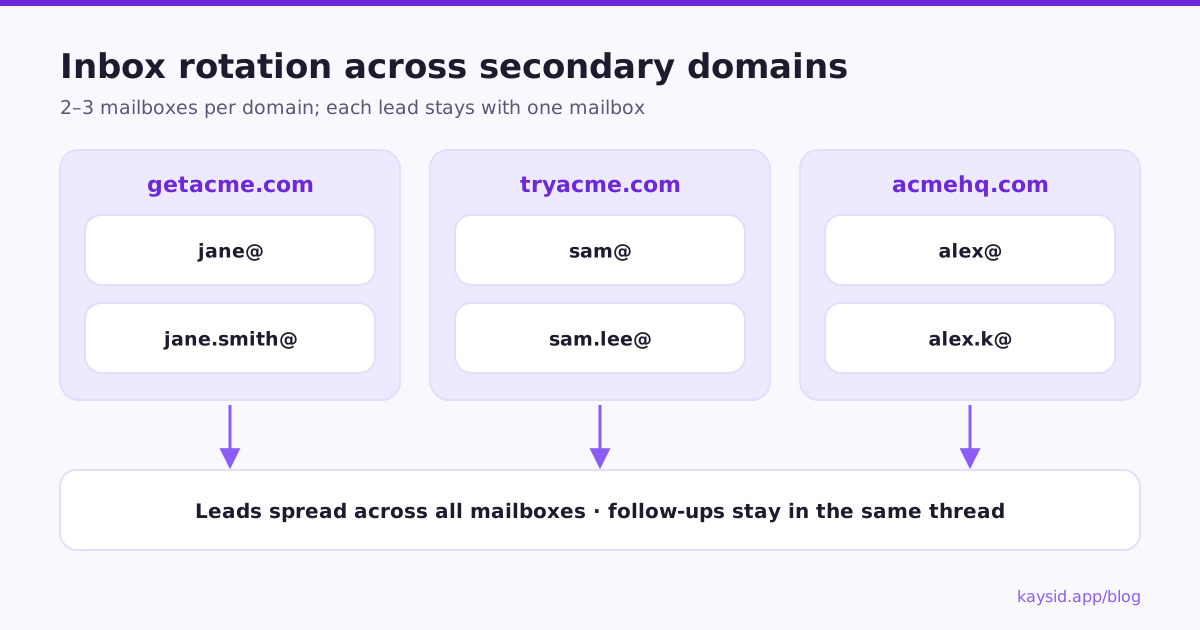
Once you know that one mailbox should send only 30 to 50 cold emails a day, the path to more volume is obvious: more mailboxes. That's what inbox rotation means: spreading a campaign across several mailboxes, usually on several secondary domains, so each one stays at a safe, human volume.
Done well, it lets you scale while protecting your main domain. Done badly, it creates a mess: follow-ups from a different person than the first email, signatures with the wrong name, and a dozen domains nobody's looking after. Here's how to do it properly.
Why use multiple mailboxes?
- Volume: ten mailboxes at 40 a day is 400 emails a day, safely.
- Resilience: if one mailbox or domain has a problem, the rest keep sending.
- Protection: cold outreach on secondary domains never risks your main domain.
- Natural patterns: several people each sending a modest amount looks like a real team.
Step 1: Get secondary domains
Register domains that are clearly connected to your brand, so recipients recognise you:
| Main domain | Good secondary domains | Avoid |
|---|---|---|
| acme.com | getacme.com, tryacme.com, acmehq.com, acme.io | acme-deals-now.xyz, acmeee.com |
- Use common extensions (.com, .io, .co) rather than cheap, spam-associated ones.
- Redirect each secondary domain's website to your main site, so anyone who checks finds you.
- Buy them a few weeks before you need them; age helps.
Step 2: Set up mailboxes
Two to three mailboxes per domain is a common, safe pattern. Use real people's names (with their permission) or real roles, not obviously fake personas.
| Domain | Mailboxes |
|---|---|
| getacme.com | jane@getacme.com, jane.smith@getacme.com |
| tryacme.com | sam@tryacme.com, sam.lee@tryacme.com |
Use Google Workspace or Microsoft 365 for the mailboxes. Then on every domain: set up SPF, DKIM and DMARC, add a profile photo and signature, and warm each mailbox up.
Step 3: Rotate leads across mailboxes
Inbox rotation should follow three rules:
- Each new lead goes to whichever mailbox has the most room left today and isn't resting between sends.
- Once a lead has been emailed from a mailbox, all follow-ups come from that same mailbox, as replies in the same thread. A follow-up from a different person breaks the conversation and looks automated.
- Each mailbox keeps its own pace and daily limit, so no mailbox is overloaded even if others are full.
Step 4: Sign as the right person
With several mailboxes in one campaign, the signature has to match the sender. If Jane's mailbox sends an email signed "Sam", the illusion of a personal note is gone. The fix is to never hard-code a name in the email text: use a placeholder like {{Sender Name}} or [Your Name], or let your tool add each mailbox's signature automatically.
Step 5: Handle replies across mailboxes
With ten mailboxes, nobody wants to log into ten inboxes (see how to choose cold email software for what else to look for). Use a unified inbox that pulls replies from every mailbox, shows which campaign and lead each one belongs to, and lets you answer from the right mailbox in the same thread.
Step 6: Monitor every domain
- Check authentication for every domain, not just the first one you set up.
- Watch bounce rates per campaign and pause when they climb.
- Register domains in Google Postmaster Tools.
- When a domain's performance drops, rest it and move its volume to healthy domains.
How many mailboxes do you need?
| Cold emails per day (incl. follow-ups) | Mailboxes at ~40/day | Domains at 2–3 per domain |
|---|---|---|
| 100 | 3 | 1–2 |
| 250 | 7 | 3 |
| 500 | 13 | 5 |
| 1,000 | 25 | 9–13 |
For the full calculation, see How many cold emails can you send per day?.
Common mistakes
| Mistake | Better |
|---|---|
| 10+ mailboxes on one domain | 2–3 per domain |
| Fake personas with stock photos | Real names, real people, real signatures |
| Follow-ups from a different mailbox | Keep each lead with one mailbox |
| Hard-coded names in templates | {{Sender Name}} or automatic signatures |
| Same person emailed by two campaigns | Check for overlap before importing |
Google Workspace or Microsoft 365?
Both work well for cold email mailboxes. Many teams use a mix, which also spreads risk across two providers.
| Google Workspace | Microsoft 365 | |
|---|---|---|
| Setup | Simple admin console; DKIM generated in Gmail settings | DKIM via two CNAME records in Defender |
| Sending limit | ~2,000 messages/day per user (hard limit) | ~10,000 recipients/day (hard limit) |
| Safe cold volume | 30–50/day per mailbox | 30–50/day per mailbox |
| Good to know | Use paid accounts, not trials | Check that SMTP authentication is enabled for the mailbox |
Keeping the setup tidy
- Keep a simple sheet of every domain and mailbox: who owns it, when it was created, its warm-up status and DNS status.
- Renew domains automatically, so a lapsed domain doesn't break a running campaign.
- Retire a mailbox properly: remove it from campaigns first, then delete it.
- Review all domains monthly, not just the newest ones.
Inbox rotation in Kaysid
- Pick several email accounts for a campaign; leads are spread across them automatically.
- Each lead's follow-ups stay in the same mailbox and thread.
- Each account has its own daily limit, warm-up cap and pace, plus your sending hours.
- Automatic signatures per account, and inline "Add your name" when you pick accounts.
- If you remove an account, its campaigns carry on with their other accounts.
- When you import leads, people already being emailed by another campaign are left out, so nobody gets two sequences at once.
- One unified inbox for replies from every account.
Frequently asked questions
What is inbox rotation in cold email?
Spreading a campaign's leads across several mailboxes so each one sends a safe, human volume. Each lead should stay with one mailbox for all of its emails.
How many mailboxes per domain for cold email?
Two to three is a common, safe pattern. It limits the impact if one domain's reputation drops.
Should I use secondary domains for cold email?
Yes. They keep your main domain safe. Choose names clearly connected to your brand and redirect them to your main website.
Should follow-ups come from the same mailbox?
Yes. Send follow-ups from the mailbox that sent the first email, as replies in the same thread.
How do I sign emails correctly with multiple mailboxes?
Don't hard-code a name. Use a sender name placeholder or let your tool add each mailbox's signature automatically, as Kaysid does.