Deliverability
Email Warm-Up in 2026: How Long It Takes and How to Do It Right
By Kaysid Team · · 5 min read
A brand-new domain is a stranger to Gmail and Outlook. It has no history, no reputation, and no reason to be trusted. If the first thing it does is send 200 cold emails, mailbox providers do exactly what you'd expect: they file them as spam.
Email warm-up fixes this by building a sending history slowly before you start cold outreach. Here's how warm-up works, how long it really takes, a week-by-week schedule you can follow, and the mistakes that throw away weeks of work.
What is email warm-up?
Warm-up is the process of gradually increasing the number of emails a new mailbox or domain sends, while those emails are opened, replied to and rescued from spam. Over a few weeks, providers learn that this sender behaves like a real person and that people engage with its mail. That reputation is what your cold emails later rely on.
Warm-up tools automate it: your mailbox exchanges real-looking conversations with a network of other mailboxes, which open the messages, reply to some, and mark them "not spam" if they land in junk.
Do you still need warm-up in 2026?
Yes, for any new domain or mailbox, and for any mailbox that has been quiet for a while. There's a fair debate about warm-up networks (providers can detect artificial patterns, and warm-up can't fix bad targeting), but the core principle isn't debatable: a sender's volume should grow gradually. Even if you never use a warm-up tool, ramp your real sending slowly.
- New domain + new mailbox: warm-up is essential.
- Existing mailbox with years of normal use: you can start cold email at low volume sooner, still ramping up.
- Mailbox that was paused for weeks: warm it back up before resuming full volume.
- Burned domain: warm-up alone rarely saves it. Fix the cause and consider a new domain.
How long does email warm-up take?
Plan for two to four weeks before a new mailbox sends meaningful cold volume, and keep a low level of warm-up running afterwards. The exact time depends on:
| Factor | Faster | Slower |
|---|---|---|
| Domain age | Domain registered months ago | Registered this week |
| Provider | Google Workspace / Microsoft 365 | Unknown shared SMTP |
| Authentication | SPF, DKIM, DMARC all passing from day one | Records added halfway through |
| Target volume | 20 to 30 cold emails a day | 50+ a day per mailbox |
| History | Mailbox already used for normal email | Fresh mailbox, never used |
A week-by-week warm-up schedule
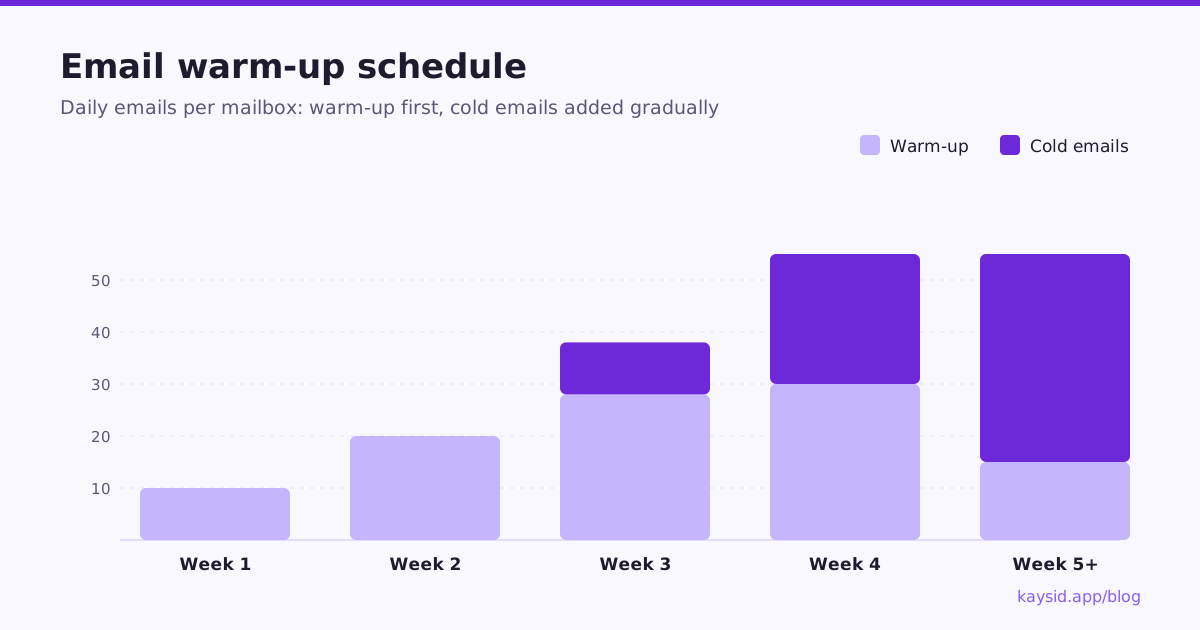
This is a conservative schedule for a brand-new Google Workspace or Microsoft 365 mailbox on a new domain, aiming for about 40 cold emails a day.
| Week | Warm-up emails / day | Cold emails / day | What to watch |
|---|---|---|---|
| 1 | 5 → 15 | 0 | Authentication passing, warm-up mail landing in inbox |
| 2 | 15 → 25 | 0 | Inbox placement steady on Gmail and Outlook |
| 3 | 25 → 30 | 5 → 15 | First replies, zero bounces |
| 4 | ~30 | 15 → 30 | Bounce rate under 2%, no spam complaints |
| 5+ | 10 → 20 (keep running) | 30 → 40 | Reply rate holding, Postmaster reputation |
How to warm up a mailbox manually
No warm-up tool? You can do a lot by hand, especially in the first two weeks:
- Send real emails to colleagues, friends and your own accounts on Gmail and Outlook, and ask them to reply.
- Subscribe to a few newsletters you actually read, and open them.
- Reply to conversations: threads with back-and-forth are a strong positive signal.
- If anything lands in spam, move it to the inbox and mark it "not spam".
- Add 5 to 10 a day, every day, rather than 50 on one day and nothing the next.
Warm-up best practices
- Set up authentication first. Warming up a domain without SPF, DKIM and DMARC builds reputation you can't use.
- Use a real sender name and signature. A profile photo on Google Workspace helps it look like a person.
- Ramp gradually and consistently. Providers watch the trend, not just the total.
- Keep warm-up running at a lower level while you send cold email, so engagement stays positive.
- Don't warm up and blast. Week 4 is not the time to send 300 emails because the warm-up looked good.
- Spread volume over several mailboxes instead of pushing one mailbox to its limit.
Common warm-up mistakes
| Mistake | Why it hurts |
|---|---|
| Starting cold sends on day one | No reputation yet, so mail lands in spam and reputation starts negative |
| Big jumps in volume | Spikes look like a compromised account |
| Stopping warm-up once campaigns start | Engagement drops just as volume rises |
| Warming the main company domain for cold email | Risks the domain your whole business depends on |
| Ignoring bounces during warm-up | A bad list in week 3 erases weeks 1 and 2 |
How do you know a mailbox is ready?
- SPF, DKIM and DMARC pass on test emails.
- Test emails to Gmail and Outlook seed accounts land in the primary inbox.
- Warm-up messages have been landing in the inbox consistently for at least a week.
- Your first small cold batch produced replies and no spam complaints.
Warm-up in Kaysid
Kaysid includes warm-up for every connected mailbox. While a mailbox warms up, its daily cold sending limit is capped automatically, so a campaign can't accidentally push a new mailbox too hard. The warm-up page shows each mailbox's progress, and campaigns spread leads across all their mailboxes with human-paced gaps between emails.
Frequently asked questions
How long should I warm up a new email domain?
Two to four weeks is typical before sending real cold volume, with cold emails added gradually from around week three. Keep a lower level of warm-up running afterwards.
Can I skip warm-up if my domain is old?
If the mailbox has a long history of normal use, you can start at low volume sooner. You should still ramp cold sending up gradually rather than starting at full volume.
How many emails should I send during warm-up?
Start around 5 to 15 a day and add a few each day, reaching roughly 30 by the end of week three or four. Consistency matters more than the exact number.
Should warm-up keep running after I start campaigns?
Yes, at a lower level. It keeps positive engagement flowing while cold volume rises.
Does email warm-up work with Gmail and Outlook?
Yes. Warm-up works with Google Workspace, Microsoft 365 and most SMTP providers. The principles of gradual volume and real engagement apply to every provider.