Deliverability
How Many Cold Emails Can You Send Per Day? (Safe Limits for 2026)
By Kaysid Team · · 5 min read
"How many cold emails can I send per day?" is the most-asked question in cold email, and the honest answer is: far fewer per mailbox than your email provider technically allows.
Google Workspace lets a mailbox send up to 2,000 emails a day. Send 2,000 cold emails from one mailbox and you'll be in spam by lunchtime. This guide explains the difference between the provider limit and the safe limit, gives you numbers for 2026, and shows how to plan mailboxes and domains for the volume you actually need.
The short answer
30 to 50 cold emails per mailbox per day, after the mailbox has been warmed up, sent at a human pace during working hours. Start lower (10 to 20) for new mailboxes and grow gradually. If you need more volume, add mailboxes and domains instead of pushing one mailbox harder.
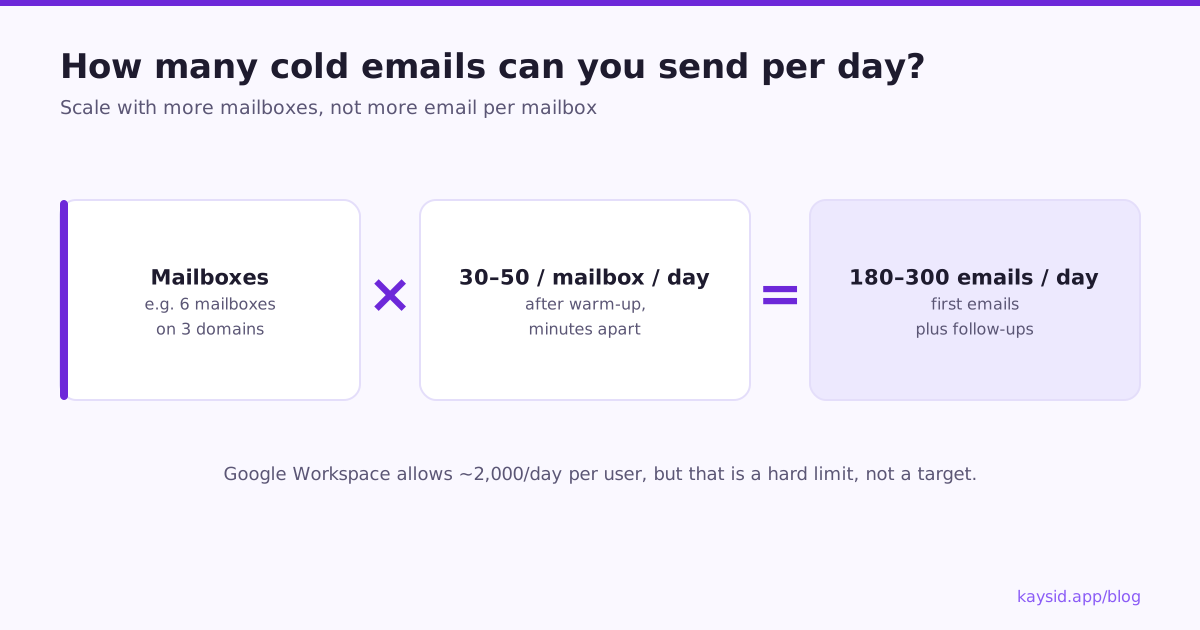
Provider limits vs. safe cold email limits
Providers publish hard limits to stop abuse. They are not targets. Hitting them is a reliable way to get flagged.
| Provider | Hard limit (approx.) | Safe cold email volume |
|---|---|---|
| Google Workspace (paid) | 2,000 messages/day per user | 30 to 50/day per mailbox |
| Google Workspace (trial) | 500 messages/day | Don't cold email from trial accounts |
| Free Gmail | 500 recipients/day | Not suitable for cold email |
| Microsoft 365 | 10,000 recipients/day per mailbox | 30 to 50/day per mailbox |
| Outlook.com (free) | Low, varies | Not suitable for cold email |
Why fewer emails per mailbox is better
- Spikes look suspicious. A person rarely sends 300 new emails to strangers in a day. A mailbox that does looks automated or compromised.
- Complaints concentrate. Every spam report counts against the sender. Spreading volume keeps any one mailbox's complaint rate low.
- One bad day hurts less. If one mailbox runs into trouble, the others keep sending while you fix it.
- Replies are manageable. 40 emails a day with a good reply rate is a real conversation load for one person.
How to calculate the mailboxes you need
Work backwards from the meetings you want:
- Decide your goal, for example 1,000 new prospects contacted per week.
- Divide by sending days: 1,000 ÷ 5 = 200 new prospects per day.
- Add follow-ups. A 3-email sequence means each prospect gets up to 3 emails, so steady-state sending is close to 3 × 200 = 600 emails a day (fewer, since replies stop follow-ups).
- Divide by safe volume per mailbox: 600 ÷ 40 ≈ 15 mailboxes.
- Spread mailboxes over domains: 2 to 3 mailboxes per domain gives 5 to 8 domains.
| New prospects / day | 3-step sequence ≈ emails/day | Mailboxes at 40/day | Domains (3 per domain) |
|---|---|---|---|
| 25 | 75 | 2 | 1 |
| 50 | 150 | 4 | 2 |
| 100 | 300 | 8 | 3 |
| 200 | 600 | 15 | 5 |
| 500 | 1,500 | 38 | 13 |
Pacing matters as much as volume
Forty emails sent in four minutes and forty emails spread across eight hours are very different signals. Good pacing means:
- Gaps of several minutes between emails from the same mailbox, with randomness, not a fixed interval.
- Sending only during the recipient's business hours and working days.
- No sending at all on weekends for B2B, unless your audience works then.
- Follow-ups and first emails mixed through the day, not all first emails at 9:00.
How many per hour?
At 40 a day across an 8-hour window, that's 5 an hour, roughly one every 12 minutes. A gap of 5 to 15 minutes between emails per mailbox is a sensible range.
Per-domain limits
Reputation is tracked per domain as well as per mailbox. Putting 10 mailboxes on one domain and sending 50 each means 500 cold emails a day from a single domain, and if it gets flagged, all 10 mailboxes go down together. Two or three mailboxes per domain is a common, safer pattern. See Sending from multiple mailboxes.
When to send less than 30 a day
- During the first two to three weeks of warm-up.
- When your bounce rate is above 2% or rising.
- When reply rates suddenly drop, a sign you might be landing in spam.
- When targeting a new, untested audience: start small, measure, then scale.
- When a mailbox has been inactive for a while.
A ramp-up plan for a new setup
Here's how a team that just bought three domains with two mailboxes each (six mailboxes) might reach about 250 emails a day without a single spike:
| Week | Per mailbox (cold) | Six mailboxes total | Notes |
|---|---|---|---|
| 1–2 | 0 (warm-up only) | 0 | Authentication checked, warm-up running |
| 3 | 5 → 15 | 30 → 90 | Best-fit leads only; watch bounces daily |
| 4 | 15 → 30 | 90 → 180 | Follow-ups from week 3 start adding volume |
| 5 | 30 → 40 | 180 → 240 | Steady state if replies and bounces look healthy |
| 6+ | 40 | ~240 | Add mailboxes, not volume, to grow further |
Signs you're sending too much
- Replies fall while volume rises.
- Bounces with "blocked", "rate limited" or "policy" in the error, rather than "user unknown".
- Google or Microsoft temporarily refuse mail with "try again later" responses.
- Seed tests start landing in spam on one provider.
- Google Postmaster Tools shows reputation dropping.
When you see these, cut volume by half for a week, check your list, and only climb back once the numbers recover.
Cold email vs. newsletter limits
If you also send newsletters or product email, keep them on a different domain or subdomain and a dedicated email service. Marketing email to subscribers and cold email to strangers build very different reputations, and you don't want a cold campaign's complaints to affect the emails your customers asked for.
How Kaysid paces your sending
- Each mailbox has a daily limit you set, and warm-up mailboxes are capped lower automatically.
- Campaigns choose a pace: careful (about one email every 9 to 12 minutes per mailbox), normal (every 5 to 6 minutes) or quicker (every 2 to 3 minutes).
- Sending hours and days in your leads' time zone.
- Leads are spread across all the campaign's mailboxes, and follow-ups stay in the mailbox that started the thread.
- The campaign page tells you how many emails a day you can send and roughly how many days the campaign will take to finish.
Frequently asked questions
How many cold emails per day from one Gmail account?
From a warmed-up Google Workspace mailbox, 30 to 50 cold emails a day is a safe range. Don't use free Gmail accounts for cold email.
Is 100 cold emails a day too many?
From a single mailbox, usually yes. Split 100 emails across two or three warmed-up mailboxes instead.
How many mailboxes per domain should I use?
Two to three mailboxes per domain is a common, safe pattern. It limits the damage if one domain's reputation drops.
Do follow-up emails count towards the daily limit?
Yes. Every email sent counts, so plan for first emails plus follow-ups when you calculate how many mailboxes you need.
What's the best time to send cold emails?
During your recipient's working hours on working days. Spread sends across the day rather than sending everything at once.