Copywriting
How to Write a Cold Email Follow-Up Sequence (Timing, Templates and When to Stop)
By Kaysid Team · · 5 min read
A large share of cold email replies come from follow-ups, not from the first email. People are busy, your email arrived at the wrong moment, or they meant to reply and forgot. A good follow-up sequence catches them on a better day.
A bad one does the opposite: "just bumping this to the top of your inbox" five times in a week is how you earn spam reports. This guide covers how many follow-ups to send, how far apart, what each one should say, and the rules that keep follow-ups helpful instead of annoying.
How many follow-ups should you send?
Two to three follow-ups after the first email (three to four emails in total) is the sweet spot for most B2B cold outreach. Beyond that, extra replies tend to be outweighed by unsubscribes and spam complaints, which hurt your deliverability for every future campaign.
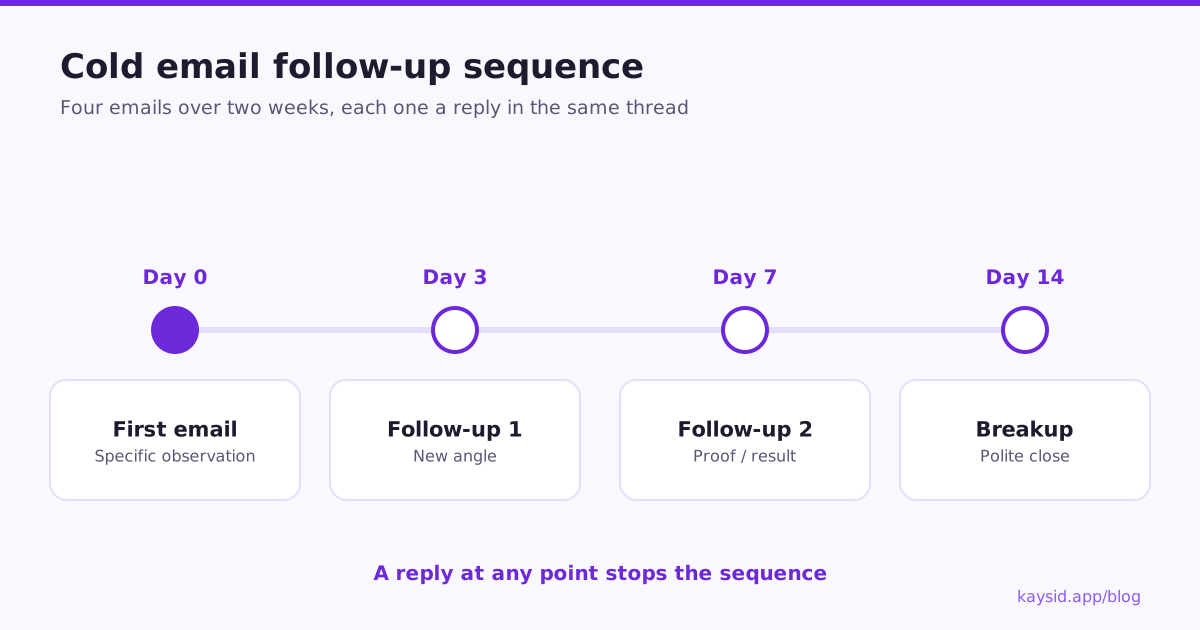
How far apart should follow-ups be?
| Send on | Gap | |
|---|---|---|
| 1. First email | Day 0 | – |
| 2. Follow-up 1 | Day 3 | 3 days |
| 3. Follow-up 2 | Day 7 | 4 days |
| 4. Breakup | Day 14 | 7 days |
Short gaps early keep context fresh; longer gaps later avoid pestering. Skip weekends for B2B audiences, and send in the recipient's time zone.
The golden rules of follow-ups
- Reply in the same thread. The earlier email sits underneath, so they have context, and the "Re:" is honest.
- Add something new every time. A new angle, a useful resource, a proof point. Never just "bumping this".
- Get shorter as the sequence goes on.
- Stop the moment they reply, including "not interested", and stop for colleagues too if one of them has answered.
- Ignore out-of-office replies as a stop signal, but don't send the next email while they're away.
- Make opting out easy in every email.
A complete four-email sequence
Email 1: the first email (day 0)
Subject: missed calls after 6pm
Hi {{First Name}}, Most dental clinics we talk to lose a few new-patient calls every evening after reception goes home. We set up an AI receptionist that answers after hours, books into your calendar and texts you a summary. Is evening coverage a gap at {{Company}}, or do you have it handled? {{Sender Name}}
Email 2: new angle (day 3)
Hi {{First Name}}, One thing I should have mentioned: it also handles the "are you open on Saturday?" and "do you take my insurance?" calls, which are most of the evening volume. Happy to send a 60-second recording of it taking a booking. {{Sender Name}}
New information, not a reminder. Shorter than email 1.
Email 3: proof (day 7)
Hi {{First Name}}, A clinic in Manchester started using it in August. They booked 23 new patients from after-hours calls in the first month, calls that used to go to voicemail. Worth a quick look for {{Company}}? {{Sender Name}}
Specific, believable proof. Only use real numbers.
Email 4: the breakup (day 14)
Hi {{First Name}}, I'll stop here so I'm not cluttering your inbox. If after-hours calls become a priority, just reply to this thread and I'll pick it up. All the best, {{Sender Name}}
Polite, gives them control, closes the loop.
Follow-up angles that work
| Angle | Example opening |
|---|---|
| New benefit | "One thing I didn't mention..." |
| Social proof | "A clinic in your area tried this last month..." |
| Useful resource | "We wrote a short checklist on this, want it?" |
| Different problem | "If evenings aren't an issue, what about..." |
| Right person | "Is someone else the best person to ask about this?" |
| Breakup | "I'll stop here..." |
Follow-ups that hurt more than they help
- Sending follow-ups as brand-new emails with new subjects, so the person has no context.
- Six, seven or eight follow-ups.
- Guilt-tripping ("I've emailed you four times now...").
- Following up after someone replied "no", or after they unsubscribed.
- Following up the whole company after one person replied.
Personal follow-ups at scale
If every lead got a personal first email, the follow-ups can be personal too. Many teams now write (or generate with AI) a full sequence per lead: email 1 specific to their situation, and follow-ups that build on it. If some leads only have a first email written, a general follow-up can cover the rest. See AI cold email personalization at scale.
How Kaysid handles follow-ups
- Each campaign is a sequence of emails with a wait (in days) before each follow-up.
- Follow-ups are sent as replies in the same thread, from the same mailbox that sent the first email.
- A lead who replies is stopped automatically, in every campaign, not just this one. Out-of-office replies don't count as replies.
- Optionally stop everyone at the same company when one person replies.
- Each step can use the lead's own email if your spreadsheet has one for that step, or the campaign's shared text if not.
- Follow-ups only go out in your sending hours, in your leads' time zone.
Frequently asked questions
How many follow-up emails should I send after a cold email?
Two to three follow-ups, so three to four emails in total. More than that tends to increase unsubscribes and spam reports more than replies.
How long should I wait before following up on a cold email?
About three working days for the first follow-up, then four, then a week. Increase the gap as the sequence goes on.
Should follow-ups be in the same thread?
Yes. Replying in the same thread gives the reader context and keeps the "Re:" honest. Kaysid sends follow-ups this way automatically.
What do I say in a follow-up email?
Something new each time: another benefit, a proof point, a useful resource, or a question about the right person. Avoid "just following up".
Should I stop following up after an out-of-office reply?
No, an automatic reply isn't a real answer, so the sequence can continue. It's best to wait until they're back before the next email.