Strategy
How to Build a B2B Lead List for Cold Email (and Clean It Before You Send)
By Kaysid Team · · 5 min read
Your lead list decides more about a cold email campaign than your copy does. The best email in the world won't get a reply from the wrong person, and a list full of invalid addresses can damage your domain before anyone reads a word.
This guide shows how to build a list that's targeted, accurate and ready to personalize: where to find leads, what to collect, how to verify and clean it, and how to format it so importing takes seconds.
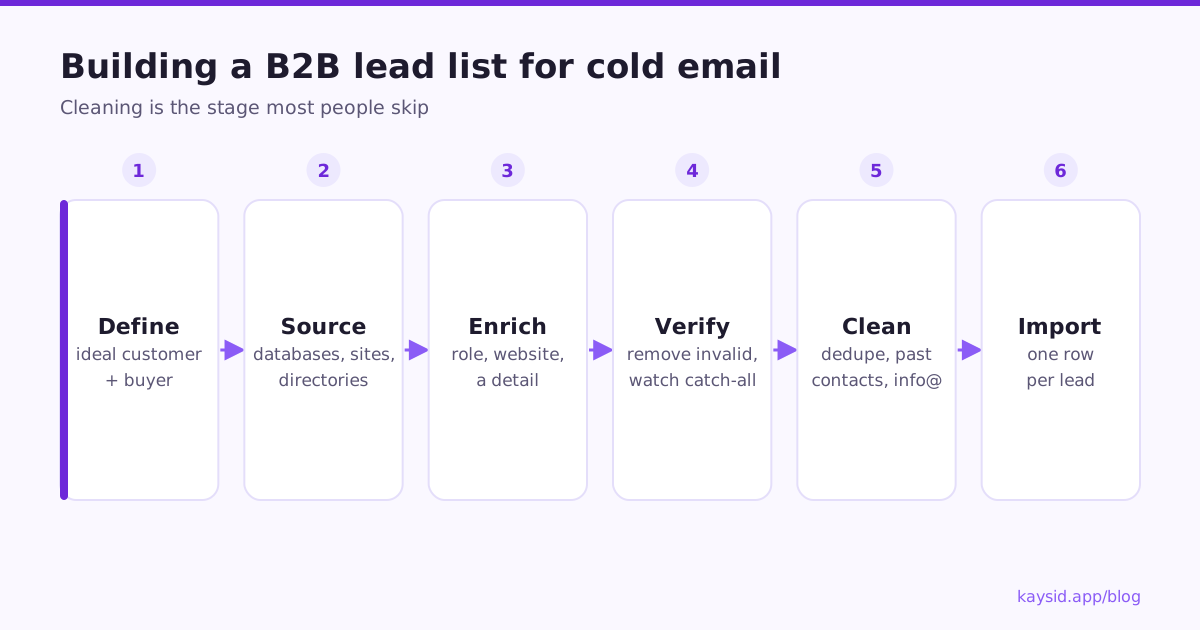
Step 1: Define who you're looking for
Before collecting a single email, write down your ideal customer profile (the companies) and your buyer persona (the people at those companies).
| Questions | Example | |
|---|---|---|
| Company | Industry, size, location, technology, signals | Physiotherapy clinics, 2–20 staff, UK, using online booking |
| Person | Role, seniority, responsibility | Clinic owner or practice manager |
| Signal | Something that makes now a good time | Hiring receptionists, recent bad reviews about phone access |
Step 2: Where to find B2B leads
| Source | Good for | Watch out for |
|---|---|---|
| B2B databases (e.g. Apollo, ZoomInfo, Lusha) | Speed and filters by role and company size | Data decay, emails that need verifying |
| LinkedIn and Sales Navigator | Finding the right person and context | You still need a verified work email |
| Google Maps and directories | Local businesses, clinics, trades | Generic info@ addresses |
| Company websites | Accurate names, roles and context | Time-consuming without help |
| Job boards | Timing signals (hiring = budget and need) | Matching the job to the decision-maker |
| Event, award and association lists | Niche, relevant audiences | Check terms of use |
| AI research assistants | Researching each company and writing notes at scale | Verify everything; AI can invent details |
Step 3: Collect the right fields
Collect what you need to target, personalize and stay compliant, and nothing more:
| Field | Why |
|---|---|
| Required | |
| First name, last name | Greeting and personalization |
| Company | Personalization and duplicate checks |
| Job title | Relevance (and GDPR legitimate interest) |
| Website | Research and personalization |
| City / country | Time zones, local relevance and which laws apply |
| Source | Where you found them (GDPR Article 14 requests) |
| A personal note or observation | Your first line |
| Their own email (optional) | If you write a full email per lead |
Step 4: Verify every email address
Run the list through an email verification service before importing. It checks syntax, whether the domain accepts mail, and whether the mailbox exists. Typical results:
| Result | What to do |
|---|---|
| Valid | Send |
| Invalid | Remove |
| Catch-all / accept-all | The domain accepts everything, so the mailbox can't be confirmed. Send carefully, in small batches, or skip |
| Unknown | Skip, or re-verify later |
| Disposable / role | Remove disposable; think twice about role addresses |
Aim for a bounce rate under 2% in your campaigns. If verification says a list is clean and you still see high bounces, stop and investigate.
Step 5: Clean the list
- Remove duplicates (same email, different capitalisation counts as a duplicate).
- Remove existing customers and anyone already in an active campaign.
- Remove people who've unsubscribed, bounced or said no in the past.
- Flag shared inboxes like info@, sales@ and hello@: they reply less and complain more.
- Fix names: "JOHN" → "John", and don't use the email address as a first name.
- Check fields used in merge tags aren't empty, or set fallbacks.
Why overlap between campaigns matters
If the same person sits in two campaigns, they get two cold sequences at once, which feels spammy and doubles your complaint risk. Someone who already replied (even "not interested") should never be cold-emailed again by a new campaign.
Step 6: Format for import
Use one row per lead and clear column names. If you're sending a personal email to each lead, add columns for each email:
| First Name | Company | Job Title | Website | Subject 1 | Email 1 | |
|---|---|---|---|---|---|---|
| ann@acme.com | Ann | Acme Physio | Owner | acmephysio.co.uk | acme's booking page | Hi Ann, I tried booking... |
Excel and CSV both work. Keep the column names simple and consistent across lists.
Keep your list fresh
- B2B data decays as people change jobs. Re-verify lists older than about three months.
- Remove bounces immediately.
- Keep a single do-not-email list for all campaigns.
- Delete data you no longer need.
How big should your list be?
Smaller than you think. A list of 200 to 500 people who all share the same problem lets you write specific emails, learn quickly from replies, and protect your domains. Once a segment works, build the next one. Scale comes from repeating a working segment, not from mailing 10,000 people at once.
| Goal | Suggested list size | Why |
|---|---|---|
| Test a new audience or offer | 100–200 | Enough replies to learn, small enough to fix mistakes |
| Run a proven campaign | 300–1,000 per segment | Keeps emails specific to one group |
| Ongoing outreach | Fresh batches weekly | Steady volume, current data |
Segment before you write
Split the list into groups that would get a different email: by industry, role, company size, location or signal. Then write (or generate) emails per segment, or per lead. A clinic owner and a hospital operations director both care about missed calls, but not in the same words.
- Use a
Listcolumn to put each segment in its own list when you import. - Add a column for the detail you'll personalize with, such as
Observation, and use it as a merge field. - Keep a
Sourcecolumn so you can see which sources produce replies, not just leads.
How Kaysid helps with lead lists
- Import Excel or CSV with automatic column detection, plus a ready-made template.
- Duplicates are skipped, and a downloadable report explains every row that wasn't imported.
- When importing into a campaign, people already being emailed by another campaign, or who replied before, are left out, with an "Add them anyway" option.
- Unsubscribed and bounced addresses are never emailed, however many times they're imported.
- The pre-launch review flags shared inboxes, empty fields and leads with no email written.
Frequently asked questions
How do I build a B2B lead list for cold email?
Define your ideal customer and buyer, find leads in databases, LinkedIn, directories and company websites, collect name, role, company and work email, verify every address, remove duplicates and past contacts, then import.
Should I buy an email list?
No. Bought lists are usually outdated, full of invalid addresses and spam traps, and hard to use lawfully. Build or source targeted lists and verify them.
How often should I verify my email list?
Before every campaign if the list is more than about three months old. B2B data changes quickly as people change jobs.
What is a catch-all email address?
An address on a domain that accepts all mail, so a verifier can't confirm the mailbox exists. Send to these carefully and watch your bounce rate.
Should I email info@ or sales@ addresses?
Usually not for personal outreach. Shared inboxes reply less and complain more. Find the named decision-maker instead.